• Blog
  • Get Help Now!
  • Customer Portal

BlueGecko Denmark

  • Why you need us
    • Why act now
    • Why are we unique
  • What we do
    • Products Supported 24/7
      • MySQL
      • Postgres
      • SQL Server
      • Open Source
      • OS & Storage
  • How we do it
    • Consulting
    • System Monitoring
    • Security
  • Support
    • Blog
      • Oracle
      • MySQL
      • News & Events
      • Oracle Applications
      • Amazon Web Services
      • Jeremiah Wilton’s Oradeblog
      • OurSQL Community Podcast
      • Remote DBA
    • Team viewer
    • Whitepapers
  • About Us
    • Philosophy
    • The Blue Gecko Teams
    • Employment Opportunities
    • Partners
    • News
    • Press
  • Contact Us

December 27, 2009 by cedwards

s3fox does not create valid export manifest files

S3fox provides a handy utility for creating import manifest and signature files; however, it doesn’t seem to properly create export manifests.  In fact, it seems like it only creates import manifest files.  The version I used was 0.4.8.

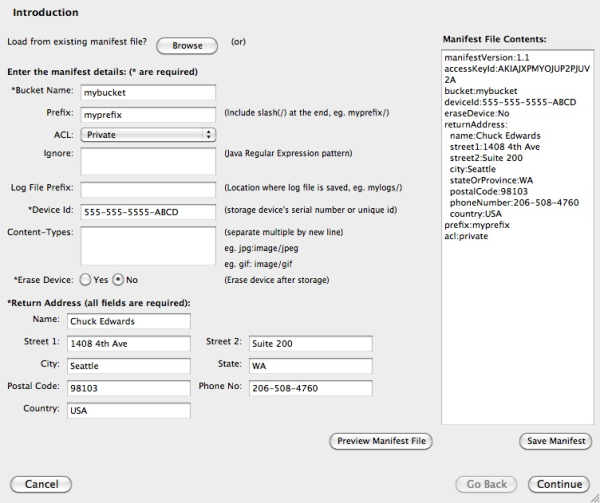
Here’s a screenshot of the s3fox create manifest interface:
s3fox configuration screen

Note there is nowhere in the GUI to specify export or import.  Note also in the manifest preview on the right that the exportBucket token is not visible.  Looking at the spec for an export  the exportBucket token is required for AWS to know where to get your data.  Without it, you’ll get a note from Amazon asking what you’re trying to do.

So, if you want to export data from an S3 bucket to a USB drive, it’s best to manually create a manifest file according to the AWS spec.

If you manually create an export manifest, you’ll also need to manually create a signature file.  The procedure for manually creating signature files was not immediately obvious (to me, anyway) on the AWS site, but I found it on Jeorge Escobar’s blog (thanks, Jeorge!)

You’ll need to download the signature tool then in a command line terminal, change to the signature tool directory and run the following command:

[code language=”plain”]java -jar lib/AWSImportClientSignatureTool-1.0.jar <manifest file> <job ID> <SIGNATURE file>[/code]

Once you have the manifest and signature file, you can simply follow the documented procedure and expect to see your USB drive in a few days.

Filed Under: Amazon Web Services Tagged With: Amazon Web Services, EC2, export/import

Categories

  • Amazon Web Services
  • Configuration Management
  • downtime
  • Drizzle
  • ebs
  • Education
  • elastic block store
  • elastic compute cloud
  • hosting
  • hot backup
  • ignorance
  • Infrastructure
  • IOUG
  • Jeremiah Wilton's Oradeblog
  • misconception
  • misconceptions
  • Monocle
  • MySQL
  • MySQL Council
  • News
  • News & Events
  • Oracle
  • Oracle APEX
  • Oracle Applications
  • Oracle Data Guard
  • Oracle Database
  • Oracle Database Appliance
  • Oracle Linux
  • Our People
  • OurSQL Community Podcast
  • outage
  • parallel
  • performance
  • podcast
  • proof
  • Remote DBA
  • replication
  • S3
  • Security
  • SQL Server
  • System monitoring
  • Tomcat
  • Uncategorized

Contact Blue Gecko

  • This field is for validation purposes and should be left unchanged.

Get Our Newsletter

  • This field is for validation purposes and should be left unchanged.

The Fine Print

  • Privacy Policy
  • Terms of Use
  • When is remote DBA the right solution
  • What are remote DBA services
  • Get Help

Virtual runs

Blog Categories

  • 24/7 support
  • Blue Gecko 360° Services
  • Products Supported 24/7

Contact Blue Gecko

Blue Gecko A/S
Slotsgade 21
DK – 4200 Slagelse
Denmark
Phone: (DK) +45 70 60 51 20

Networks

  • Email
  • Twitter

© Blue Gecko Group